
WAF Rules
WAF Rules are the programmable half of smoxy's security layer. Where the managed WAF and the managed scenarios decide for you, a WAF rule is yours: you describe which part of a request to inspect, how to compare it, and what the edge should do when it matches — block, challenge, throttle, skip, or just raise the request's anomaly score.
Rules are evaluated at the edge on every request, in the same pass as smoxy's own platform rules. A saved change is live within moments.
INFO
Beta: The rule engine is in beta. Platform-managed rules apply to every zone, and details of rule behavior may still change.
Where WAF Rules sit
The rule engine is the last stage of the security layer. Everything that can exempt a request has already run by the time a rule is evaluated:
- 1IP Listszone + global allowlist and blocklist
- 2Access Rulesallow · block · challenge · skip
- 3Reputation & Under Attack Modemanaged scenario verdicts
- 4WAF Rulesyour rules and the smoxy-managed rules, in one sorted list
That order has two practical consequences:
- An allowlisted IP, a verified search-engine crawler, or an Access Rule with Allow or Skip (waf) exempts the request before the engine runs. No WAF rule will see it. Use this deliberately for monitoring tools and trusted integrations.
- Basic Auth runs after the engine and is never skipped by a WAF rule. A
skiprule does not hand out a password.
See the Request Lifecycle for the full picture.
Two kinds of rules
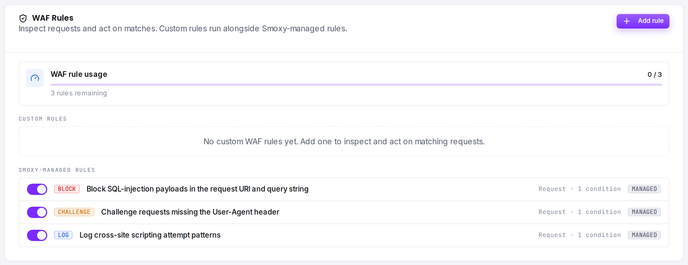
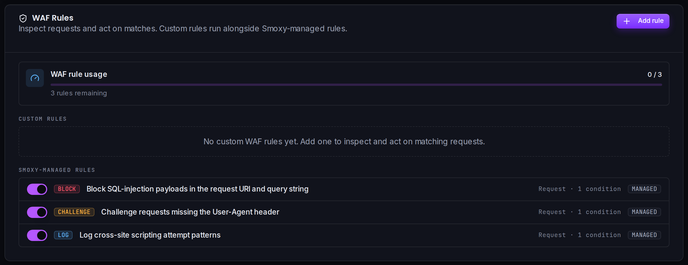
The WAF Rules card on the zone's WAF page holds two lists:
| List | Who owns it | What you can do |
|---|---|---|
| Custom rules | You | Create, edit, delete, enable/disable |
| Smoxy-managed rules | smoxy | Turn each one on or off for this zone — the rule itself is read-only |
Both lists are merged into a single evaluation list at the edge and sorted by Order, so a custom rule at order 0 is evaluated before a managed rule at order 10. Managed rules are covered in smoxy-managed rules.
Rule budget
A zone gets 3 custom WAF rules by default. The card shows a WAF rule usage meter (2 / 3, "1 rule remaining", "Limit reached"). Contact support if your zone needs more.
The budget covers custom rules only. Managed rules are unlimited and do not count against it, and it is separate from the shared rule budget used by Access, Rewrite and Conditional Rules.
Creating a rule
- Open the zone's WAF page (Security → WAF).
- In the WAF Rules card, click Add rule.
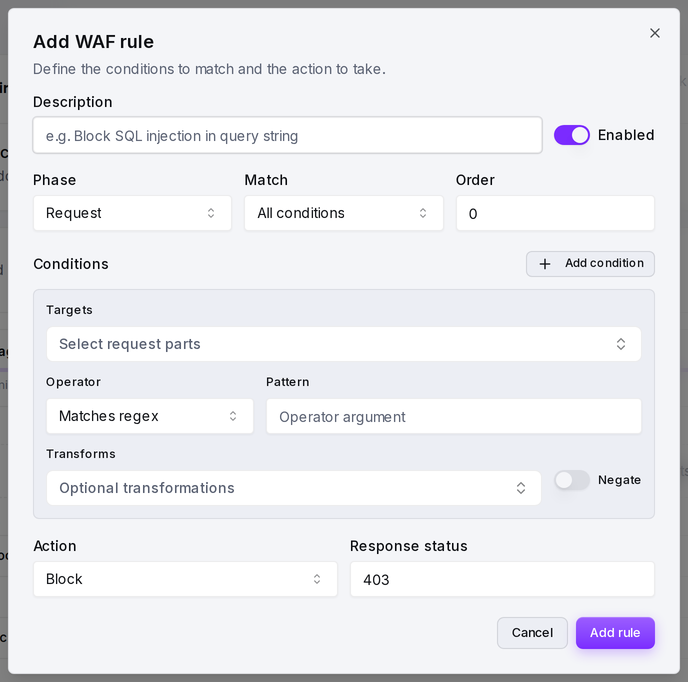
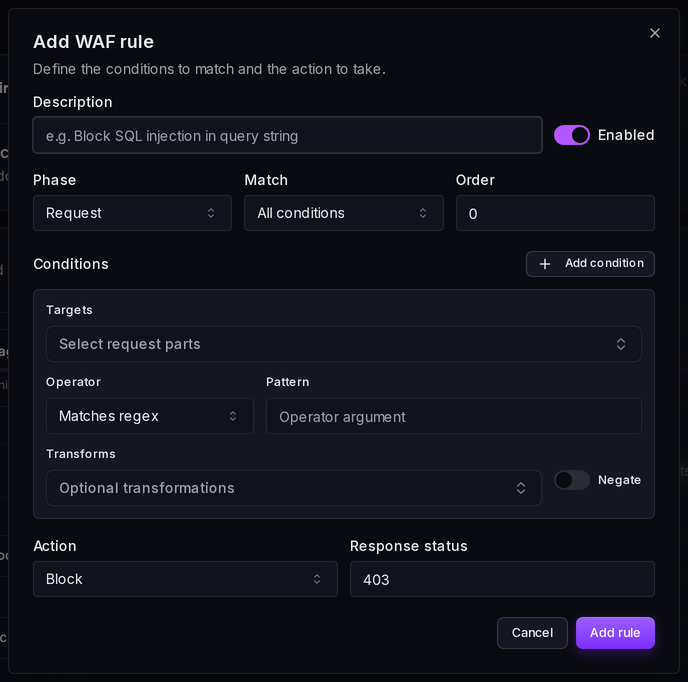
- Fill in the description, conditions and action.
- Click Add rule to save.
Rule fields
| Field | Meaning |
|---|---|
| Description | A label, up to 255 characters. It is what the rule list shows and what appears in support conversations. Never evaluated. |
| Enabled | Off keeps the rule but takes it out of evaluation entirely — it matches nothing and adds no score. |
| Phase | Request — the rule is evaluated before the request goes upstream. |
| Match | All conditions (AND) or Any condition (OR). Default: all. |
| Order | Ascending. Lower runs first. Give every rule a distinct number — rules sharing an order have no defined relative order. |
| Conditions | One or more condition rows: targets, an operator, a pattern, optional transforms, optional negate. |
| Action | What happens on a match, plus the parameters that action needs. |
Order is a plain number you set yourself. Leaving gaps (10, 20, 30) makes it easy to slot a rule in later.
Conditions
A condition asks one question about the request: take these parts of the request, optionally clean them up, then test them with this operator against this pattern.
Targets — what gets inspected
A target yields a list of values. Multi-valued targets fan out, and the operator runs against each value independently — which is why sprinkling extra query parameters does not help an attacker.
| Target | Yields | Notes |
|---|---|---|
uri | The request path | Already percent-decoded and normalized. Query string excluded. |
uri.raw | Path and query, verbatim | Exactly as the client sent it, undecoded. The one target that survives encoding tricks — see the first example. |
query | The raw query string | Everything after ?, still URL-encoded, as one value. |
args | Every query-parameter value | Decoded. Repeated parameters fan out. Query string only — form fields are not here. |
args.names | Every query-parameter name | Catches parameter-name probes and prototype-pollution attempts. |
headers | Every request-header value | All of them. A repeated header fans out. |
headers.user-agent | That header's value | |
headers.referer | That header's value | |
headers.host | That header's value | |
headers.content-type | That header's value | |
cookies | Every cookie value | Cookie names are not inspectable. |
body.raw | The whole request body | One value, any content type — including multipart, which is otherwise unparsed. |
body.form | Every form-field value | Only when the content type is x-www-form-urlencoded. |
body.json | Every leaf value in the JSON | Recursive, max depth 32. Only when the content type contains json. Keys are not extracted, only leaves. |
ip | The client IP | The real visitor address, not a proxy hop. See Client IP. |
method | The HTTP method | Uppercase, e.g. POST. |
host | The request host | |
geoip.country | ISO country code | Empty when unresolvable. |
geoip.asn | AS number | Numeric. 0 when unknown. Pair with a numeric operator or within. |
A condition may list several targets. It is true when any value of any listed target passes the operator.
INFO
Request bodies are inspected conditionally. A body.* target sees data only when the method is POST, PUT, PATCH or DELETE, the Content-Length is 256 KB or less, and the body stayed in memory. A large upload is skipped silently, so do not write a body rule expecting it to cover file uploads.
Transforms — the anti-evasion layer
Transforms run on each extracted value, left to right in the order listed, before the operator sees it. Attackers evade with encoding far more often than with novel payloads, so this is where most real robustness comes from.
| Transform | What it does | Example |
|---|---|---|
lowercase | Lowercases the value. ASCII-reliable. | UNION → union |
uppercase | Uppercases the value. | abc → ABC |
urlDecode | Percent-decodes %XX and turns + into a space. | %2e%2e%2f → ../ |
urlDecodeUni | Decodes IIS-style %uXXXX first, then percent-decodes. Codepoints ≥ 256 are dropped. | %u003cscript → <script |
htmlEntityDecode | Decodes &#NN;, &#xHH; and the named entities lt gt amp quot apos nbsp. Unknown names are left alone. | <script> → <script> |
base64Decode | Decodes base64. If decoding fails the original value passes through unchanged, so it is safe to apply speculatively. | c2VsZWN0 → select |
normalizePath | Collapses repeated slashes and resolves . / .. segments. Does not decode first — put urlDecode before it. | /a/./b/../c → /a/c |
removeNulls | Strips \0 bytes, the classic filter-splitting trick. | ad\0min → admin |
removeWhitespace | Strips every whitespace character. | UNION SELECT → UNIONSELECT |
compressWhitespace | Collapses each run of whitespace to a single space, keeping word boundaries. | UNION SELECT → UNION SELECT |
length | Replaces the value with its character count. Pair it with a numeric operator. On a multi-valued target this is the length of each value, not the number of values. | abcd → 4 |
TIP
A sane default stack. For content inspection on args, body.* or uri: urlDecode → removeNulls → lowercase. Add htmlEntityDecode for XSS work and normalizePath for path-traversal work. Order matters: decode before you normalize, normalize before you lowercase.
Operators — how the comparison is made
| Operator (UI label) | Value | Semantics | Pattern format |
|---|---|---|---|
| Matches regex | rx | PCRE regular expression, unanchored partial match. Case-sensitive unless you write (?i) or add lowercase. | (?i)union\s+select |
| Detect SQL injection | detectSQLi | libinjection's SQL-injection detector — the same library the major open-source WAFs use. | none |
| Detect XSS | detectXSS | libinjection's XSS detector. | none |
| Contains | contains | Literal substring search, no regex interpretation. Case-sensitive. | Plain string |
| Equals (string) | streq | Exact equality. Case-sensitive. | Plain string |
| Begins with | beginsWith | Literal prefix test. | Plain string |
| Ends with | endsWith | Literal suffix test. An empty pattern never matches. | Plain string |
| Matches any phrase | pm | The value contains any one of the literals. Built for long keyword lists. | Whitespace-separated: sqlmap nikto nmap |
| Is within set | within | The value equals one member of the set. | Whitespace- or comma-separated: GET, HEAD |
| IP matches | ipMatch | Parses the value as an IP and tests it against a set of addresses and CIDRs. IPv4 and IPv6. | 10.0.0.0/8, 2001:db8::/32 |
| ≥ > ≤ < = (numeric) | ge gt le lt eq | Both sides are read as numbers; a non-numeric value on either side is simply false. Pair with length or geoip.asn. | A number, e.g. 2048 |
WARNING
The regex case trap. Matches regex does not force case-insensitivity — the rule gets to choose. Nearly every false negative in a hand-written rule comes from writing union select and being defeated by UnIoN SeLeCt. Write (?i)union\s+select, or add the lowercase transform.
A malformed pattern never errors the request: the condition simply evaluates to false.
Combining conditions
Match decides how the condition rows combine:
- All conditions — every row must be true (AND).
- Any condition — at least one row must be true (OR).
There is no nesting and no per-row operator: one flat list, one combinator. For anything more complex, split it across two rules.
WARNING
Negate inverts the whole condition, not each value. On a multi-valued target, Negate means no value matched — not some value did not match. A negated condition on args is false as soon as a single parameter matches.
That behavior is also the only way to test for absence. A target that resolves to nothing yields an empty list, so nothing can pass the operator and the condition is false; with Negate on, it becomes true:
Targets:  headers.referer
Operator: Matches regex
Pattern:  .
Negate:   on
→ true when the request carries no Referer header at all
Actions
| Action | At the edge | Ends the request? | Needs |
|---|---|---|---|
| Block | Serves the zone's security page with 403 and stops. | yes | Response status |
| Challenge | Serves the JavaScript proof-of-work interstitial. A client that already holds a valid pass goes straight through. | unless the pass is valid | — |
| Throttle | Slows the request down without rejecting it. The request continues to cache and origin. | no | Rate and/or Delay |
| Skip | Takes the decision for this request so no later WAF rule can act, and records skip. | no | — |
| Log | Records the match and takes no action — but also takes the decision. See the warning below. | no | — |
| Score | Adds to the request's anomaly score and lets evaluation continue. The only genuinely passive action. | no | Score |
Block
A blocked request is answered with 403 and the zone's security page, which you can brand under Custom Pages.
Score and the anomaly threshold
Score does not decide anything on its own. It adds its value to a running total for the request, and if no rule took the decision and the total reaches 5, the request is blocked. The threshold is fixed at 5 and is not configurable per zone.
This is the tool for signals that are suspicious but not conclusive on their own — a scripted user agent, a missing Accept-Language, an odd method. None of them justifies a block; three of them together might.
Score is added for every action, not just Score. A blocking rule can carry a score as well, so the match still registers in the request's total.
Throttle
Throttle has two levers, and they hurt different abusers:
- Rate (bytes/s) caps response-body throughput. This is the lever for bandwidth-heavy scrapers.
0means no cap. - Delay (ms) adds a one-off pause before the request reaches cache or origin, capped at 5000 ms. This is the lever for many-small-request bots, where a tiny response body makes a rate cap meaningless.
At least one of the two must be non-zero. If several sources throttle the same request, the strongest wins: the largest delay and the smallest non-zero rate.
Skip
Skip exempts a request from the rest of the WAF rule list — including the smoxy-managed rules that would otherwise fire. Give it a low Order so it runs first.
It does not undo the earlier security stages. Reputation verdicts, Under Attack Mode and the IP lists have already been applied by the time the engine runs; to exempt a request from those, use an Access Rule with Allow or Skip.
WARNING
Log is not passive. It records the match and takes no action of its own, but it does take the decision — so every later rule that would have blocked never gets to decide, and the anomaly threshold is skipped too.
For passive observation that leaves later rules free to act, use Score with a score of 0. The match is still recorded and still visible in the traffic log.
How a request is decided
The outcome is decided by order, not by severity. A challenge at order 10 beats a block at order 20.
- Your custom rules and the smoxy-managed rules are merged into one list and sorted by Order ascending.
- Each rule is evaluated in turn. Disabled rules are skipped.
- On a match, the rule's score is added to the running total — for any action, not just
Score. - The first matching rule whose action is not
Scoretakes the single decision slot. Later rules can still add score, but they can no longer change the decision. - After the list, if nothing took the decision and the accumulated score has reached 5, the request is blocked.
- The verdict is recorded on every request, matched or not — see Checking that a rule fired.
So: exactly one rule decides. Everything else either contributes score or is too late.
smoxy-managed rules
Rules under Smoxy-managed rules are written and maintained by smoxy and apply across the platform — things like blocking config-file harvesting, challenging Tor exit nodes, or throttling aggressive crawlers. You cannot edit them; you can only turn each one on or off for your zone with the row's switch.
Each row carries tags that tell you how the rule reaches your zone:
- Managed — the rule is smoxy's, not yours.
- Opt-in — the rule is off for your zone until you switch it on. Rules without this tag are on by default and stay on unless you switch them off.
Your explicit choice always wins over the default, and it is remembered: if smoxy later changes a rule's default, a zone that already made a choice keeps it.
Turning a managed rule off
Switch the row off. The rule stops enforcing for your zone immediately — it no longer blocks, challenges or throttles, and it no longer feeds the anomaly threshold.
It does keep being evaluated. A rule that is off for your zone contributes to a separate shadow score that appears in the traffic log with waf_rule_action = shadow, so both you and smoxy can see whether it would have fired. That makes an opt-out reversible on evidence rather than a guess.
TIP
Leave managed rules on unless one is demonstrably causing false positives for your application. If you are unsure, look at the traffic log first, or contact support.
Checking that a rule fired
Every request carries the rule-engine verdict, whether or not anything matched. The values are captured in the zone's traffic log, and are available as response headers when debug headers are enabled for the zone.
| Response header | Traffic-log field | Meaning |
|---|---|---|
s-waf-rule | waf_rule | The id of the rule that decided, or score when the anomaly threshold fired. |
s-waf-rule-action | waf_rule_action | block, challenge, throttle, skip, log, or shadow. |
s-waf-rule-score | waf_rule_score | The request's anomaly score, including the shadow score from rules that did not enforce. |
WARNING
Two verdicts, similar names. waf_action and waf_score are not the rule engine — they carry the IP-reputation verdict from the managed scenarios. A request blocked by one of your WAF rules routinely shows waf_action: allow right next to waf_rule_action: block.
When you are investigating a WAF rule, read waf_rule_action.
s-allowlist tells you the opposite story: it names the trust list that exempted a request from the engine entirely (global, tenant, or verified_bot). If a rule you expected to fire did not, check this first.
Examples
Example 1: a file probe hidden in a tracking parameter
Taken from live traffic. A request looked like an ordinary product page:
/fahrrad-bekleidung/…/castelli-espresso-2-w-radtrikot-kurzarm-damen-kaufen.html
  ?srsltid=AfmBOoovzZW4ddo…jwWUE/.env.development
A .env probe was appended to the end of a legitimate Google srsltid parameter. The uri target would have missed it — uri stops at the ?. This is what uri.raw is for.
Description: Block environment and config file probes
Match:       Any condition
Order:       10
Condition:   Targets    uri.raw
             Transforms urlDecode, lowercase
             Operator   Matches any phrase
             Pattern    .env .git/config wp-config.php .aws/credentials id_rsa
Action:      Block
Example 2: SQL injection, without writing regexes
Detect SQL injection needs no pattern — it runs a purpose-built detector over each value.
Description: Block SQL injection in query and form input
Match:       Any condition
Order:       20
Condition 1: Targets    args, body.form
             Transforms urlDecode, removeNulls
             Operator   Detect SQL injection
Condition 2: Targets    body.json
             Transforms removeNulls
             Operator   Detect SQL injection
Action:      Block
Example 3: score suspicious automation instead of blocking it
Neither signal justifies a block on its own. Together with anything else scoring, they cross the threshold.
Description: Raise anomaly score for scripted clients
Match:       Any condition
Order:       200
Condition 1: Targets    headers.user-agent
             Transforms lowercase
             Operator   Matches any phrase
             Pattern    curl wget python-requests go-http-client libwww-perl
Condition 2: Targets    headers.user-agent
             Operator   Matches regex
             Pattern    ^$
Action:      Score
Score:       3
Example 4: slow a scraper down without blocking it
Description: Throttle bulk catalogue crawling
Match:       All conditions
Order:       50
Condition 1: Targets    uri
             Operator   Begins with
             Pattern    /catalog/
Condition 2: Targets    geoip.asn
             Operator   Is within set
             Pattern    14061, 16509, 24940
Action:      Throttle
Rate:        65536
Delay:       250
Hosting-provider ASNs are a strong signal for a shop catalogue: real customers rarely browse from a datacenter.
Example 5: exempt an endpoint that trips the rules
A webhook receiver posting unusual payloads can look like an attack. Give the exemption a low order so it runs before anything else.
Description: Skip WAF rules for the payment webhook
Match:       All conditions
Order:       0
Condition 1: Targets    uri
             Transforms normalizePath, lowercase
             Operator   Equals (string)
             Pattern    /webhooks/payment
Condition 2: Targets    ip
             Operator   IP matches
             Pattern    203.0.113.0/24
Action:      Skip
Pair the path with a source check. A skip rule on the path alone is an open door with your address on it.
Example 6: block a vulnerable endpoint while you patch
A virtual patch buys you the time to deploy a real fix.
Description: CVE-2026-31887 — block order-code enumeration
Match:       All conditions
Order:       5
Condition 1: Targets    uri
             Transforms urlDecode, normalizePath, lowercase
             Operator   Begins with
             Pattern    /store-api/order
Condition 2: Targets    method
             Operator   Equals (string)
             Pattern    POST
Condition 3: Targets    body.json
             Operator   Matches regex
             Pattern    ^[a-f0-9]{32}$
Action:      Block
Managing rules through the API
Every field in the editor is available on the API, plus a few that the interface does not expose.
| Method | Endpoint | Purpose |
|---|---|---|
GET | /api/zones/{zoneId}/security/waf-rules | List the zone's custom rules |
POST | /api/zones/{zoneId}/security/waf-rules | Create a rule |
GET | /api/zones/{zoneId}/security/waf-rules/{id} | Read one rule |
PATCH | /api/zones/{zoneId}/security/waf-rules/{id} | Update a rule |
DELETE | /api/zones/{zoneId}/security/waf-rules/{id} | Delete a rule |
GET | /api/zones/{zoneId}/security/global-waf-rules | List the managed rules applied to the zone |
PATCH | /api/zones/{zoneId}/security/global-waf-rules/{id} | Turn a managed rule on or off for the zone |
Creating the scripted-client rule from example 3:
curl -X POST "https://api.smoxy.eu/api/zones/412/security/waf-rules" \
  -H "Authorization: Bearer $SMOXY_TOKEN" \
  -H "Content-Type: application/json" \
  -d '{
    "description": "Raise anomaly score for scripted clients",
    "enabled": true,
    "phase": "request",
    "order": 200,
    "match": "any",
    "conditions": [
      {
        "targets": ["headers.user-agent"],
        "transforms": ["lowercase"],
        "operator": "pm",
        "pattern": "curl wget python-requests go-http-client libwww-perl"
      },
      {
        "targets": ["headers.user-agent"],
        "operator": "rx",
        "pattern": "^$"
      }
    ],
    "action": "score",
    "score": 3
  }'
Turning a managed rule off for a zone:
curl -X PATCH "https://api.smoxy.eu/api/zones/412/security/global-waf-rules/550e8400-e29b-41d4-a716-446655440000" \
  -H "Authorization: Bearer $SMOXY_TOKEN" \
  -H "Content-Type: application/merge-patch+json" \
  -d '{"enabledForZone": false}'
See API Tokens for authentication.
Fields the interface does not expose
| Field | Effect |
|---|---|
stop | Ends rule evaluation entirely once this rule matches — later rules do not even add score. Ignored for managed rules that are off for the zone. |
expression | An escape hatch for logic the condition list cannot express, using the same expression language as Access Rules. Evaluated only when conditions is empty. |
Validation
The API rejects a rule that fails any of these:
- At least one condition, or an
expression. - Every condition has a non-empty
targetsarray and a knownoperator. - Every operator except
detectSQLianddetectXSShas a non-emptypattern. action: blockcarries astatusbetween 100 and 599.action: throttlecarries a non-zerorateBpsand/ordelayMs.- Targets and transforms are from the lists on this page.
Things to know
- Order decides, not severity. The first matching non-
Scorerule wins. Keep exemptions at the bottom of the number range and blocks above them, and give every rule a distinct order. LogandSkipsilence later rules. OnlyScoreis passive.- Regexes are case-sensitive unless you say otherwise with
(?i)orlowercase. - Decode before you compare. A rule without transforms is one
%2e%2e%2faway from being useless. uriis normalized,uri.rawis not. Inspect both when you are hunting for smuggled payloads.- Bodies over 256 KB are not inspected. Neither are bodies on
GET. - A rule cannot override an earlier decision. Allowlisted addresses, verified crawlers and Access Rule exemptions never reach the engine.
- Blocks answer
403. Brand the page under Custom Pages. - Test with
Score: 0first. Ship a new rule passively, watchwaf_rulein the traffic log for a day, then switch it to the action you actually want.
Where to go next
- Security & WAF — the surrounding security layer
- Access Rules — the earlier, coarser policy layer
- Threat Lookup — investigate a single address
- Request Lifecycle — where every stage runs