
Blocklist & Allowlist
Each zone has its own Blocklist and Allowlist -- simple per-zone lists of IP addresses and CIDR ranges that let you block, challenge, or always allow specific sources. They are the most direct way to control how individual IPs are treated for a zone.
Overview
The two lists are opposites and both operate per zone:
| List | Description | Effect on matching traffic |
|---|---|---|
| Blocklist | IP addresses and CIDR ranges blocked for this zone | Listed IPs are blocked or challenged |
| Allowlist | IP addresses and CIDR ranges allowed for this zone | Listed IPs bypass security checks |
Both lists accept individual IP addresses and CIDR ranges, so you can target a single client or an entire network block.
Blocklist
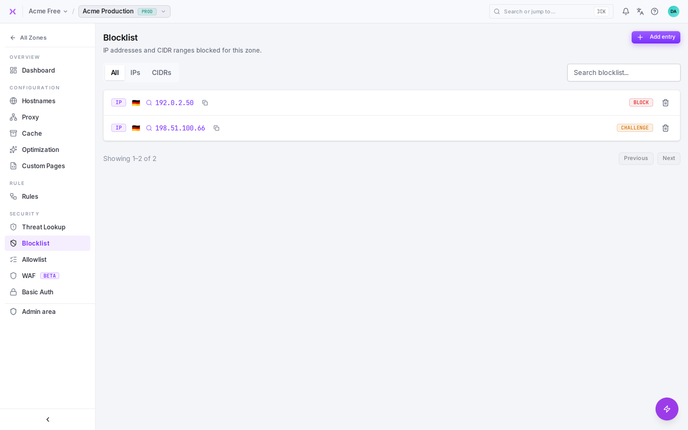
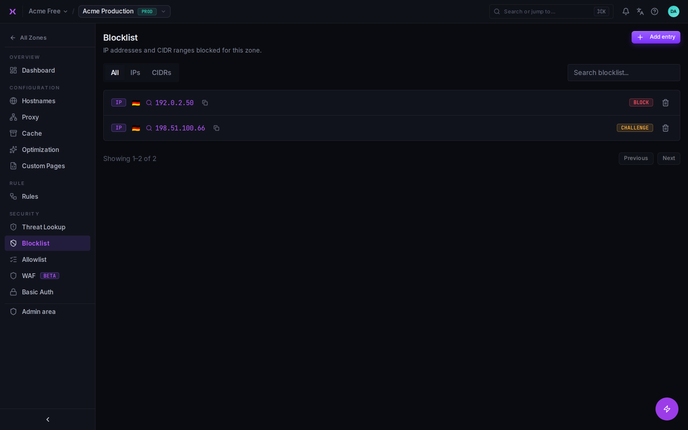
The blocklist holds IP addresses and CIDR ranges blocked for this zone. Traffic from a listed source is blocked or challenged before it reaches your origin.
Entries can be added in two ways:
- Directly on this page -- add an IP or CIDR range to the list.
- From a lookup -- on the Threat Lookup page, Force block or Challenge creates or updates a blocklist entry for the IP you investigated.
This makes the blocklist the place where manual blocks and blocks escalated from an investigation come together for review.


Allowlist
The allowlist holds IP addresses and CIDR ranges allowed for this zone. Traffic from a listed source bypasses security checks -- it is not evaluated by the WAF, managed scenarios, or reputation-based decisions for this zone.
Allowlisted traffic bypasses the scenario engine entirely. Allow hits are flagged internally as s-allowlist and are neither ingested nor scored by the managed scenarios -- an allowlisted IP builds up no threat score and can never be blocked or challenged by a scenario. This makes the allowlist the right tool for monitoring services, health checks, and internal crawlers whose request patterns would otherwise look suspicious.
Two precise notes on scope: access rules and Basic Auth still apply to allowlisted traffic, and because the zone lists are evaluated customer-first, a zone allowlist entry even overrides smoxy's global blocklist for this zone (see the Request Lifecycle).
Add an IP or CIDR range directly on the page to allow it.


INFO
Note: Allowlisting an IP bypasses security checks for that address, which removes a layer of protection for any traffic coming from it. Use the allowlist only for sources you fully trust -- for example your own office network, monitoring services, or a partner's known IP range.
IPs and CIDR Ranges
Both lists accept:
- Individual IP addresses -- to target a single client.
- CIDR ranges -- to target an entire network block in one entry.
Use a CIDR range when you want to cover a contiguous set of addresses (such as a provider's subnet) without listing each IP separately.
Zone Lists vs. Access Rules
The blocklist and allowlist are intentionally simple: they match on the IP address alone. When you need to allow, block, or challenge traffic based on richer conditions -- such as country, URL path, user agent, or combinations of these -- use Access Rules instead.
| Use this | When you want to… |
|---|---|
| Blocklist / Allowlist | Block or always-allow specific IPs or CIDR ranges, with no other conditions |
| Access Rules | Match on country, path, user agent, or other request properties |
Zone Lists vs. Global Lists
The lists on this page are your zone's own lists -- you manage them and they apply only to this zone.
Beyond them, smoxy also maintains a global blocklist and a global allowlist, plus global reputation data -- distinct mechanisms that apply across all zones to catch widely known bad actors. You don't manage any of these; they work automatically alongside your zone-level lists. When an IP is acted on globally, the Threat Lookup page shows the Source of the decision so you can tell a global decision from one of your own.
One asymmetry is worth knowing: smoxy's global allowlist is absolute. Reserved for smoxy's own trusted infrastructure, it takes precedence over your zone's lists -- an IP on the global allowlist is let through even if you have it on your zone blocklist, and it also bypasses your access rules. Basic Auth is the exception: no allowlist bypasses it, global or zone-level, so a password-protected zone still answers 401 to a trusted IP without valid credentials. Your zone allowlist, conversely, still overrides smoxy's global blocklist for your zone (see the Request Lifecycle).
Important Considerations
- Per-zone scope: The blocklist and allowlist apply only to the zone you're editing. Other zones have their own independent lists.
- Allowlist bypasses security: Allowlisted IPs skip security checks entirely. Only add sources you fully trust.
- IP-only matching: These lists match on IP address and CIDR range only. For condition-based control, use Access Rules.
- Two ways to block: Blocklist entries can be added here directly or created from Threat Lookup via Force block / Challenge. Both end up on the same list.
- Global lists are managed by smoxy: smoxy's global blocklist, global allowlist, and reputation data operate across all zones and aren't editable here. You manage only your zone's lists.